Showing posts with label Android Apps. Show all posts

aShell Launcher Homescreen Deluxe v1.3.3

aShell Launcher Homescreen Deluxe v1.3.3
Requirements: Android 2.1+
Overview: aShell - Advanced Shell Launcher (home screen). Easy and Cool. Try it right now.
aShell - Android default home screen replacement also known as 'shell' or 'launcher'. BETA version (bugs are possible).

It have innovate docking bar with usable calls log, text messages and task manager (under apps button). It also have on-screen settings where you can set for example wallpaper or transition effect and preview it on your screen.

aShell is our vision how mobile UI should look. For now it have not all features we want to develop. More new features coming soon, but let us know what you lack right now.

Key features:
- Base launcher features
- Skin in Android 4.0 ICS style
- Animated 3D clock widget (weather coming soon)
- Innovate dockbar with fast access screens
- Calls log (speed dial, call, SMS, add to contacts)
- SMS log (quick message, reply, copy, translate)
- Task manager (quick launch, switch, close, uninstall, market, details)
- Personalization (fast bluetooth, visibility, wi-fi, sync, wallpapers, effects, sounds, other settings and preferences)

Features in development:
- Advanced App drawer
- Landscape mode
- Skins support
- Speed optimization
- Memory usage optimization

What's in this version:
Help us to translate aShell to your native language
aShell Launcher Translations - Crowdin.net
added Italian translation
added missed calls and messages notification counter
added desktop screen looping
added ICS-like folders

Note:
Enable Deluxe functions.

More Info:
Code:
https://play.google.com/store/apps/details?id=com.mobilityflow.ashell
https://play.google.com/store/apps/details?id=com.mobilityflow.ashell.deluxe
Read More ...

CamCard BCR Western v3.0.3_20120516 apk

CamCard BCR Western v3.0.3_20120516 apk
CamCard - BCR (Western) v3.0.3_20120516
Requirements: Android2.x,auto-focusing camera, support Nexus、Droid、Desire、Galaxy and etc.
Overview: A Professional Business Card Reader
CamCard is the best business card reader. It can capture business card images with phone-based camera, recognize the card image content, and the recognized result is automatically organized as a contact and saved into phone address book and Card Holder. In addition, CamCard contains many useful features, such as email signature recognition, QR code generation and recognition, export Excel files and etc.

Main features:
-Automatically trim and enhance card image before save into Card Holder.
-Options to save into the phone/Gmail/Exchange contact.
-Automatically recognize the language type of the card image content.
-Automatically rotate the card image
-Batch shooting or importing card images for recognition
-QR code generation for the contact’s content
-QR code recognition for the contact’s content
-Email signature recognition
-Double-side business card image capturing
-Search contact in Card Holder
-Export contact as vcf or Excel file in Card Holder
-Add note
-Password protection
-Support Likedin invitation or search
-Support business card recognition for English, Danish, Dutch, Finnish, French, German, Hungarian, Italian, Norwegian, Portuguese, Spanish, and Swedish

What's in this version:
1. bugfix on a sync issue
2. improve account selection when saving recognition result
3. improve online backup performance

More Info:
Code:
https://market.android.com/details?id=com.intsig.BCRLatam
Read More ...

Smart Screen ON PRO v1.4 apk

Smart Screen ON PRO v1.4 apk 
Smart Screen ON PRO v1.4
Requirements: Android 1.5 and up
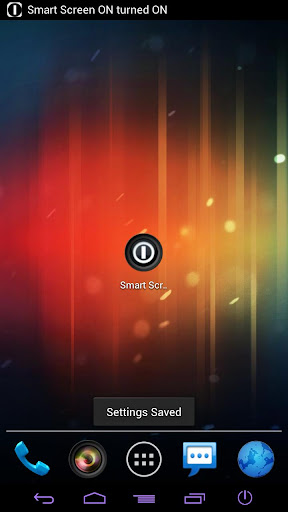
Overview: Smart screen ON is an innovative app which turns your proximity sensor into a power button


If you have a big phone with no physical button on the front(Galaxy Nexus for example, you can turn on or turn off the phone just tapping or waving your hand (finger) on proximity sensor.

FEATURES:
When you change the settings, remember saving and restarting service using built in app specific button.
There are two mode available, both mode can coexist:

+WAVE MODE:
Wave (move) your hand/finger on proximity sensor, even without touching it.
You can set the amount of waves you want to use to turn on/off screen and the time between each wave.
Do you want to wave your hand quickly or slowly?

+TAP AND SWIPE MODE:
1) Tap proximity sensor using your finger;
2) Wait for the first vibration;
3) Swipe (remove) quickly your finger, before it vibrates for the second time.
You can set the time before the first and the second vibration.

+DISABLE SENSOR
You can also disable sensor after an amount of time you can set in the app panel.
The app will disable the whole service and proximity sensor after X time of inactivity.

+STATISTICS
Statistics include:
A)Smart Screen ONs;
B)Smart Screen OFFs;
C)Total power button saves;
D)The power used by your proximity sensor (which is very very low).

+START ON BOOT
If you check this, the app will start on boot.

+HIDE ICON
If you hide the icon, the app could be instable and could be killed by Android in low memory conditions.

+ENABLE FOR TURNING SCREEN OFF
The app has been created to turn screen off, but I also give you the ability to turn screen off.

+DISABLE WHEN LANDSCAPE
The sensor will stop working when landscape.

+INCOMPATIBILITY
-HTC Desire HD is not compatible with "wave mode" because its proximity sensor doesn't work as it should.

What's in this version:
[1.4] Fixed force closes

More Info:
Code:
https://play.google.com/store/apps/details?id=it.android.smartscreenon
Read More ...

Call Timer Pro v1.0.9 apk

Call Timer Pro v1.0.9 apk 
Call Timer Pro v1.0.9
Requirements: Android 2.1 and up
Overview: CallTimerPro was designed to help you limit the time of your incoming and outgoing calls for those with plans where the first 5, 10, 20 or xx minutes are free. If that is your case, get ready to save some money! 


Is the free version useful? Support me buying the paid version

CallTimerPro was designed to help you limit the time of your incoming and outgoing calls for those with plans where the first 5, 10, 20 or xx minutes are free. If that is your case, get ready to save some money!

This app has the following features:

1. AUTO HANG UP.
2. AUTO REDIAL.
3. CONFIGURE ALERT TIMES BASED ON EACH CONTACT.
4. CONFIGURE VIBRATION ALERT.
5. CONFIGURE SOUND ALERT.
6. FAST DIAL FROM THE APP.
7. STATUS BAR NOTIFICATIONS
8. REAL TIME CALL TRACKING.
9. CONFIGURE THE DAYS THE APPLICATION IS ENABLED.

In the following page you can find information about these features and how to configure them:
User Manual

Please let me know your comments, suggestions or bug reports to support@calltimerpro.com (only english).

NOTE: Before installing this version, uninstall the free version and once the application is installed open it to validate the license (this process is automatic and only Internet connection is required).

What's in this version:
1. Improve compatibility with Android ICS.

More Info:
Code:
https://market.android.com/details?id=com.TouchSpots.CallTimerPro
Read More ...

Clipper Plus v2.0.3.0 apk

Clipper Plus v2.0.3.0 apk 
Clipper Plus v2.0.3.0
Requirements: Android 2.1 and up
Overview: Take control of your clipboard with Clipper, the #1 clipboard manager! Fully compatible with Android 3.x and 4.0!


Clipper Plus is a simple but powerful clipboard manager & clipboard historian for your phone or tablet. Don't worry about losing your clipboard's contents: Clipper automatically remembers everything that you've copied. Open Clipper at any time from the notification bar to copy, view, edit or share old clippings. Save and organize clippings into different lists. Store repetitive pieces of text in Clipper as clippings and copy them whenever you need to.

Clipper Plus includes the following extra features:
✔ Keep more than the 20 newest clipboard clippings!
✔ Unlimited clippings in each list!
✔ Search clippings!
✔ Unlock new preferences and customization options!
✔ Insert dynamic values like the current date or time to your quick clippings!
✔ And more coming soon!

Clipper Plus will be installed as a *separate application* from the free Clipper. After installation, start Plus and your data will be migrated automatically. Afterwards, you can uninstall Clipper Free.

(After installing Clipper, you will need to start it once to activate monitoring. You will see a quick start tutorial. Task killers may interfere with Clipper.)

What's in this version:
Fixed a possible crash
Added validation for list names on creation
Disabled context menu while in selection mode
Fixed blank clippings after clearing on Samsung devices
We only have a finite amount of space here. Please see Clipper — Changelog
-----
IF YOU LOST YOUR DATA AFTER UPDATING FROM 1.2 TO 2.0, please see Clipper 2.0 data loss fix for a fix. Do NOT follow these instructions if you haven't been affected. We are very sorry for the inconvenience.

More Info:
Code:
https://play.google.com/store/apps/details?id=fi.rojekti.clipper
Read More ...

AutoKiller Memory Optimizer Pro v7.5.2 apk


AutoKiller Memory Optimizer Pro apk v7.5.2
Requirements: Android OS 1.0+
Overview: AutoKiller Memory Optimizer is not a regular task manager.
AutoKiller is an award winner minfree tweaker, it fine tunes android systems inner memory manager to keep your device fast over time. As a side effect it also lowers battery consumption. Also includes a manual process/service manager.

- ROOT REQUIRED to set minfree values, unrooted devices will not have this feature
- if you have questions or you face errors please check home page or write mail
- for more details see home page
- donation is only available via paypal atm. because payed apps are not available in all countries yet

Donators and PRO users receive additional features:
- no ads
- alternate preset enabled
- Chuck Norris mode enabled
- alternate preset (while screen is off)

Please be careful, apps with very similar look and name are distributed, they can be malicious.

kw: minfree, optimize, memory, process, task, speed, improve, clean, root, magyar

What's in this version:
7.5.2:
-fixed a rare issue
7.5:
-added root only badge and dialog
-completely revised donation/pro handling
-option to reinitiate validation
-check if pro key is on external storage
-updated processlist loading logic
-fixed processes not refreshing when coming back after a memory cleanup
-use android string resources where possible
-alternate background for tweaks elements and widgets when clicked
-updated translations
7.4.2:
-bugfixes

More Info:
Code:
https://play.google.com/store/apps/details?id=com.rs.autokiller
Read More ...

Autorun Manager Pro v3.4.2 apk

Autorun Manager Pro v3.4.2 apk
Autorun Manager Pro v3.4.2
Requirements: for Android version 2.1 and higher
Overview: Autorun Manager (formerly Autorun Killer) is an ultimate tool that lets you disable all the autostarting apps you don't need. Unfortunately this app is misunderstood many times so please read help carefully and/or mail the developer if you have questions.
There are many applications that automatically start when you turn on your device; many of these you don't use or need, they just consume your valuable resources. This app sports a basic mode for the regular users and an advanced mode for power users with rooted devices.

Autorun Manager in basic mode lets you manage applications that start up when you boot your device. Applications are terminated right after they start, but if the application is programmed to restart itself this can fail. Please note that some applications are written so that they cannot be stopped because of the android system design. These kind of applications are marked as 'self-restarter' and are better to leave enabled.

In advanced mode you gain control over all the system-wide events and enable-disable application starts. This is the ultimate solution to control what you want to be started, but you also can break apps, so this feature is only for experienced users with rooted devices.

Donators and PRO users receive additional features:
- no ads
- basic mode's prevent restart feature is selectable
- can block more than 2 receivers in advanced mode
- Chuck Norris mode enabled

What's in this version:
3.4.1:
fix for restore all receivers
3.4:
completely revised pro handling
option to reinitiate validation
check if pro key is on external storage
updated applicationlist loading logic
fixed processes not refreshing when coming back after a cleanup
use android string resources where possible
updated translations

More Info:
Code:
https://play.google.com/store/apps/details?id=com.rs.autorun
Read More ...

Beejive IM instant messenger 3.5.6 apk

Beejive IM instant messenger 3.5.6 apk
Beejive IM - instant messenger 3.5.6
Requirements: Android 2.1+
Overview: Instant message, chat, & IM on AIM, Yahoo, GTalk, MySpace, Jabber, Facebook, MSN
Instant message, chat, & IM on AIM, Yahoo, ICQ, GTalk, MySpace, Jabber, Facebook, MSN (Windows Live Messenger or WLM). BeejiveIM is an IM app that allows you to chat / instant message with all your IM buddies anywhere you go! Chat on AIM, Yahoo, ICQ, GTalk, MySpace, Jabber, Facebook, MSN (Windows Live Messenger or WLM).

Beejive's reliable and efficient networking has been tested and proven on multiple platforms. Move from cellular and wifi connections seamlessly. Stay connected after you close the application and be notified when you get a new message through push notifications (OS 2.2+). After being out of coverage BeejiveIM automatically reconnects and picks up where you left off.

BeejiveIM uses your phone's existing data plan or wifi connection, so you can save money by reducing your text messages.

BeejiveIM Key Features:
- BeejiveIM uses your existing data plan: no per-message charges.
- Reliable and efficient networking: be connected 24/7, and it's gentle on your battery.
- Be connected even after you close the application. Get notified instantly when you get a new message with Push Notifications (OS 2.2+).
- Works with multiple IM networks, multiple accounts per network: AIM®/iChat, MSN®, Yahoo!®, GoogleTalk®, Facebook IM, Jabber, and MySpace IM.
- Send and receive files, including pictures and voice notes. View and forward received documents.
- Desktop-like instant messaging with all of your IM buddies from a single intuitive user interface.

Chatting Features:
- Real-time chats: quick switch between multiple simultaneous chats.
- Group chats: chat with multiple buddies on AIM, Yahoo, GTalk, or MSN.
- Full Unicode support, chat in any language supported by your Android device.
- Landscape option, type with a larger keyboard.
- Chat history: Email chat logs to save chat history.
- Hyperlink support, automatically parses links for web pages, YouTube videos, email addresses, twitter usernames, and phone numbers.
- Emoticons support.
- SMS out, chat with your SMS buddies through AIM or Yahoo SMS out.

Account & Buddy Features:
- Manage your buddy-list, including add/remove, nicknames, groups, block, approve/deny requests.
- Sort/group/search your buddy list.
- Control your own availability, set auto-away and custom status messages, be invisible, change privacy controls.
- Configurable alerts, customizable sound, vibrate settings.
- Buddy icon support, view your friends' icons, set your own.

What's in this version:
v3.5.6
- bug fixes & stability improvements
v3.4
- Updated group chat functionality
- Added ability to create a group chat (under Chat List screen)
- fixed issues with receiving group chat invitations
- Updated to latest Facebook apis
- minor bug fixes / enhancements
** Chat menu items can now be found by tapping the header in the chat screen.

More Info:
Code:
https://market.android.com/details?id=com.beejive.im
Read More ...

VideoVault v4.1.7 apk

VideoVault v4.1.7 apk
VideoVault apk v4.1.7
Requirements: Android OS 1.6+
Overview: Hide videos behind a password. People won't even know they exist.
VideoVault helps to hide videos behind a password protected wall, hiding them from people and applications on your phone.
Want to hide pictures, please check out PhotoVault. One of the best selling app in Android Market. And for hiding text messages, checkout SmsVault (for Android system earlier than 2.0) or SmsDroid (for Android 2.0 or later).

What's in this version:
4.1.5
Fixed when multiple hide failure issues on some devices
Fixed when change mode from public mode FC issue
4.1.4
Added Sort by Names for both folders and videos
Folder is added. By default, folder is disabled. And you can choose list view vs. grid view from settings

More Info:
Code:
https://play.google.com/store/apps/details?id=PSS.VideoVault
Read More ...

Prepaid Widget Pro v1.3.3.0 apk

Prepaid Widget Pro v1.3.3.0 apk
Prepaid Widget Pro v1.3.3.0
Requirements: Android v2.1+
Overview: Your balance, free minutes, traffic and SMS as simple text widgets! You need not even know that updates have taken place and the app will never turn on the screen to send a request.
Your balance, free minutes, traffic and SMS as simple text widgets! You need not even know that updates have taken place and the app will never turn on the screen to send a request.

Cell providers reply to short commands like *100# or *100*1# with useful information. Using these codes you can monitor your account balance, the status of free minutes and SMS or remaining data traffic.

WILL NOT WORK ON SOME STOCK SE AND SAMSUNG DEVICES WITHOUT ROOT!

Advantages:

- Awesome widgets
- Totally silent updates
- Simple to use
- Advanced and unique features

Features:

- Screen never turns on
- Silent USSD requests
- Understands SMS replies
- Easy value extraction from replies
- Sequential replies
- Powerful customization
- Smart text widgets
- Highly customizable updates
- Logging
- Low profile
- Lowest battery use in class

The app is out of beta, but we continue to welcome your feedback. Please join in with comments and suggestions!

If you have problems, Please try a clean installation. If you need help, please use the "Write to developer" item in Settings, this will ensure we look at your error quickly.

Recent changes:
1.3.3.0
Added full Russian translation
Fixed many small errors from user logs
Fixed rare radio restart issue on some ICS buils

1.2.3.2

Fixed repeated telephony errors on some devices.

1.2.3.1

Updated daemon code for new ICS devices like HTC One X
Updated daemon compatibility with ICS telephony services
Less description »

Latest version: 1.3.3.0 (for Android version 2.1 and higher)

More Info:
Code:
https://play.google.com/store/apps/details?id=fahrbot.apps.ussd.widget.pro
Read More ...

Total Commander for Android v1.0 Final and Plugs apk

Total Commander for Android v1.0 Final and Plugs apk
Total Commander for Android v1.0 Final + Plugs
Requirements: Android 1.6+
Overview: Total Commander for Android is a twin panel file manager
Main features:
Copy, Move whole subdirs
Inplace rename, create dirs
Delete (no recycle bin)
Zip and unzip, unrar
Properties dialog, change attributes
Built-in text editor
Search function (also for text)
Select/unselect groups of files
Select by tapping on file icons
List of installed Apps (built-in plugin)
FTP client (plugin)
WebDAV (Web folders) (plugin)
LAN access (plugin)
Root support for the main functions
Send files via Bluetooth (OBEX)
Thumbnails for pictures
Two panels side by side, or virtual two panel mode
Bookmarks as in Total Commander
Directory history through dropdown list
Configurable button bar for changing directories, internal commands, launching apps, and sending shell commands
Simple help function in English, German, Russian, Ukrainian and Czech
Supported languages of the main program: English, German, Czech, Danish, Dutch, French, Greek, Hungarian, Italian, Korean, Polish, Russian, Simplified Chinese, Slovak, Slovenian, Spanish, Swedish, Traditional Chinese and Ukrainian

What's new:
2012-05-18 Fixed: Position cursor on renamed file when renaming single file via context menu
2012-05-15 Fixed: Use android:configChanges="locale" for all top level dialogs to avoid flickering on screen orientation changes when using a non-default locale
2012-05-15 Added: Show hint about selecting files each time the user chooses a function without selecting anything
2012-05-15 Added: New menu item "Totalcmd (file" which returns "file:" URL as in older TC versions, e.g. when attaching a file in GMail app
2012-05-15 Fixed: Return "content:" URL instead of "file:" to GET_CONTENT intent. See: Using GET_CONTENT does not return a file URI anymore | OpenIntents
2012-05-10 Fixed: Program flickering on Android 4 after rotating screen by 90� (only when language different from system was chosen)
2012-05-08 Fixed: Crash trying to unbind service if the service was closed by Android
2012-05-08 Fixed: Handle case where the background service is restarted - then the passed intent is null!

More Info:
Code:
http://android-apps.com/tag/total-commander/
Read More ...

Time Recording Pro v4.05 apk

Time Recording Pro v4.05 apk
Time Recording Pro v4.05
Requirements: Android 2.0+
Overview: Timesheet manager - easy to use, highly adaptive
This is the "Pro" version of Time Recording, market leader in timesheet apps in the Google Play store.
Timesheet manager - easy to use, highly adaptive

This is the "Pro" version of Time Recording, market leader in timesheet apps in the Google Play store.

→ PLEASE USE THE FREE VERSION FOR A COUPLE OF DAYS BEFORE GOING PRO! Refund time is too short to test all the features, the free version has all the core functionality.

• Free and Pro versions are basically identical, so free version users will feel at home.
• "Pro only" features are «Google calendar sync» and «Dropbox integration for export,backup&restore».
• Migration to "Pro" is easy: install and open "Pro" - the app will prompt for import of data and settings from the free version.
• Usage of Free and Pro version in parallel is supported but may lead to confusion. Consider uninstalling the free version a few days after "Pro" migration.

More Info:
Code:
https://play.google.com/store/apps/details?id=com.dynamicg.timerecording.pro
Read More ...

reddit is fun golden platinum v2.3.2 apk

reddit is fun golden platinum v2.3.2 apk
reddit is fun golden platinum v2.3.2
Requirements: Android 1.6+
Overview: reddit is fun
unofficial(ly fun) reddit client
*golden platinum edition*
Golden platinum version
Tablet optimized and with widget

Icon by choofins. Additional icons by Matt K.

**REPLACE your existing widgets to FIX CRASHES!**

Permissions:
* INTERNET - The Internet
* BOOT - to restore mail notifications on device boot
* EXTERNAL STORAGE - thumbnail caching

What's in this version:
2.3.2 (May 17): Fixed FC, loading
2.3.1 (May 16)
* Fixed frontpage not loading for some users (thanks ThatDeadDude)
* Fixed clicking on inbox items
* Fixed duplicate menu button on ICS
* Fixed saving spot when leaving app
* Preliminary **spoiler tag** support
2.3 (May 11)
* Fixed "End of list"
* Fixed youtube videos closing
* Mail Ringtone Setting
2.1
* Multi-account support
* Widget now available for everyone
* Draft storage now available for everyone

More Info:
Code:
https://play.google.com/store/apps/details?id=com.andrewshu.android.redditdonation
Read More ...

Change My Hostname Root v1.3 apk

Change My Hostname  Root v1.3 apk
Change My Hostname ★ Root v1.3
Requirements: Android 2.2+
Overview: Changes your device host name on the network, so instead of having "android_AEF78f8e9d0h45" you can specify whatever name you want and it will stay that way even after you restart your device,
Requires ROOT access

New permission used to set the host name after your device has been restarted, now it will maintain the host name you specified after power off and on. RECEIVE_BOOT_COMPLETED.

Changes your device host name on the network, so instead of having "android_AEF78f8e9d0h45" you can specify whatever name you want and it will stay that way even after you restart your device,

it does not work without root, please make sure you have rooted your device before

i will not provide instructions on how to root your phone, search google for help
How To Root Android Phone / Tablet

Tested and working OK on Desire, Maybe your phone not Rooted, or where did you checked your Hostname after the change? some routers keep the hostname for some time after the change

More Info:
Code:
https://play.google.com/store/apps/details?id=com.vcastroi.hostname
Read More ...

SMS2PC Desktop SMS v2.6 apk

SMS2PC Desktop SMS v2.6 apk
SMS2PC Desktop SMS v2.6
Requirements: Android 1.5+
Overview: Send and receive SMS via your phone from your PC, Mac or Linux computer. Fast and clean, the interface is a pleasure to use and easy to learn. Save your self time, don't pick your phone up when a text arrives, just read and respond directly from your computer.
SMS2PC routes SMS from your phone to your PC so you can quickly reply or compose

- Sale week

Send and receive SMS via your phone from your PC, Mac or Linux computer. Fast and clean, the interface is a pleasure to use and easy to learn. Save your self time, don't pick your phone up when a text arrives, just read and respond directly from your computer.


Features:
- Auto PC location (no need to enter IP address on WIFI)
- Forwards SMS from mobile phone to desktop (osx, windows or linux(beta))
- Multi-send messages from desktop
- Phone address book sync with phone
- Handles send notifications and delivery notifications
- Secure Encryption
- Customizable interface
- USB support (enable debugging on phone)
- WIFI support
- Connect over internet via 3G
- Syncs message history
- Message smiles/emoticons
- Custom desktop audio notifications
- Streamlined, simple and clear interface

More Info:
Code:
https://play.google.com/store/apps/details?id=uk.org.scottishgeek.sms2pcpaid.androidclient
Read More ...

Satellite Finder v2.8.7 apk

Satellite Finder v2.8.7 apk
Satellite Finder v2.8.7
Requirements: Android 1.5+
Overview: Assists in alignment of satellite dish antennas using augmented reality. Determines local position by using GPS/Skyhook; Automatically computes all values necessary to align antenna; uses magnetic sensor to help during alignment (emits sound when aligned). Ideal for RVs, Campers, aligning second dish, or use as professional installer.
Assists in alignment of satellite dish antennas using augmented reality. Determines local position by using GPS/Skyhook; Automatically computes all values necessary to align antenna; uses magnetic sensor to help during alignment (emits sound when aligned). Ideal for RVs, Campers, aligning second dish, or use as professional installer.

* Camera Support
* Auto/Manual Image Capture with email/save
* Alignment Assist
* Custom Point of Interest (POI) using Google Seach
* Multi-LNB Support
* Over 250 satellites (Europe/Americas/USA ...)
* Specify Favorite Satellites for quick lookup

More Info:
Code:
https://play.google.com/store/apps/details?id=com.iss.SatelliteFinder
Read More ...

Aix Weather Widget donate v0.1.9.1apk

Aix Weather Widget donate v0.1.9.1apk
Aix Weather Widget donate v0.1.9.1
Requirements: Android 1.6+
Overview: Aix is a pure homescreen app widget that shows temperature, maximum/minimum precipitation and sun rise/set times graphically to give you a compact and accurate forecast.
Detailed 24-hour weather forecast in a 4x1 widget

Aix is a pure homescreen app widget that shows temperature, maximum/minimum precipitation and sun rise/set times graphically to give you a compact and accurate forecast.

Weather data is taken from Norwegian Meteorological Institute and NOAA National Weather Service. Data will be most accurate for Europe and the US.

Please check out the introduction by either opening the app from the market, or by using the menu key while on the Aix configuration screen. If you have any issues with the widget, please email me so I can help you.

This widget is designed to work in a portrait 4x1 format. It will work in 4x1 landscape, but this is not what the widget has been designed for. Improved tablet support will be added in the future.

NB: This application is in BETA, and is under development.

More Info:
Code:
https://play.google.com/store/apps/details?id=net.veierland.aixd
Read More ...

WW Points Plus Diary & Scanner v21.4 apk

WW Points Plus Diary & Scanner v21.4 apk
WW Points Plus Diary & Scanner v21.4
Requirements: Android 1.6+
Overview: Do you want a Points tracker, HUGE food lookup, comprehensive restaurant lookup and barcode scanner? Do you want to track activity points, weekly points and your daily target points? Do you want to graph your weight loss and journal everything you eat? Nothing touches this app for function vs price on the Android market.
Do you want a Points tracker, HUGE food lookup, comprehensive restaurant lookup and barcode scanner? Do you want to track activity points, weekly points and your daily target points? Do you want to graph your weight loss and journal everything you eat? Nothing touches this app for function vs price on the Android market.

Updated for 2012 changes including target of 26.

Updated to work with ICS

NOTE - NOT A TABLET APP - IT MAY WORK BUT NOT GUARANTEED

Look at the 3500+ reviews: Users say this is THE BEST tool available for helping you track and stay focused on your weight loss.
FEATURING:

-- MANY CALCULATORS --
All use Points / Points Plus / Points Pro (UK), AUS for their calculations.

-- BARCODE SCANNER --
Quickly scan items and get their points!

-- FOOD DATABASE --
Online database with 30k+ items. Growing each and every day. Items for all supported systems

-- RESTAURANT DATABASE --
Pick the place and menu item and let the application tell you how many points it is!

-- MEAL BUILDER --
Using any of the points you have added to the application, you can combine them into 'meals' (groups of points) and save time. This really helps to build your own food database into a very usuable, comprehensive tool.

-- FULL JOURNALLING --
Includes automated time stamping to easily see what you have eaten and when is a snap. Full ability to go back historically

-- RECYCLED ITEMS --
Anything that you add into your tracker using any of the ways will be added to your own custom database automatically. These foods will then be available to you in a list and adding them again takes no time. Over time you will build your very own CUSTOM food database tailored you your needs with the foods you want in it. Combine this will meals and it is VERY POWERFUL! Recycled items can be sorted by most used for extra convenience.

-- CATEGORIES FOR POINTS --
Optionally categorize your point entries as Breakfast, Lunch, Dinner, or Snacks. View special graph of how you use categories.

-- ACTIVITY POINTS TRACKING --
Includes AP calculator and diary tracking of weekly AP. AP can then be used for swapping with real points during the week they are accumulated.

-- WEEKLY POINTS TRACKING --
App automatically adds to weekly points for daily overages.

-- TARGET POINTS CHANGE ALERT--
As you lose weight your target points change. You will get alerted with a new value when entering your weight loss.

-- TARGET POINTS CALCULATOR --
Includes nursing and partially nursing mom's calculations. Also included maintenance point allowance for those that are in maintenance mode. Works for Points, Points Plus, Pro, AUS. Allows for 26 minimum to be compliant with Points Plus 2012.

-- TRACKING OF LIQUIDS, DAIRY, OILS, MULTIVITAMIN --

-- HANDY DAILY NOTES AREA --

-- BOTH METRIC AND IMPERIAL SYSTEMS --
Simple choice of pounds or inches and kilograms or centimeters. Perfect for non USA buyers.

-- GRAPHING TOOLS --
See your progress charted visually

-- DAILY REMINDER TO ENTER YOUR POINTS --
Optional helpful reminders to enter points and weight loss on meeting day.

-- WIDGET --
Shows points used that day, weekly points, weight loss and activity points

-- BACKUP DATABASE AND RESTORE --
Save your data when you are changing handsets.

-- EXPORT to HTML --
Chart on SD card you can also email

-- LANDSCAPE OR PORTRAIT MODE SUPPORT --

-- NO MEMBERSHIPS NEEDED --

-- NO ADS --

-- TIPS AND FAQ SUPPORT --

-- SPANISH LANGUAGE SUPPORT --

-- DEDICATED DEVELOPER --

More Info:
Code:
https://play.google.com/store/apps/details?id=com.ultimate.points.diary
Read More ...

bytNotes v2.1.1 apk

bytNotes v2.1.1 apk 


With bytNotes, you can now be warned before you talk!

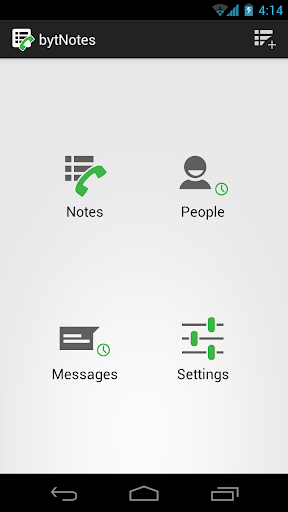
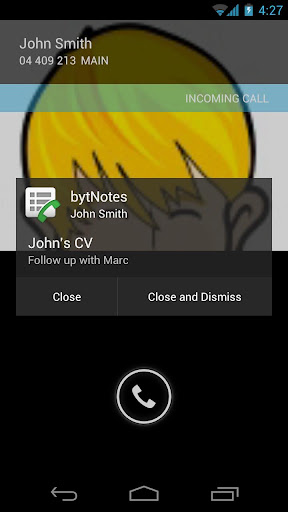
bytNotes is a simple notepad application with a very handy twist. It allows you to create notes and link them to multiple contacts from your address book. If any of these contacts calls you, the related notes are displayed in an overlay for you to read before you answer.

What's in this version:
- Added birthday bytNotes

More Info:
Code:
https://market.android.com/details?id=com.outwalk.android.bytnotes
Read More ...

Android Voice Xtreme v2.08 apk

Android Voice Xtreme v2.08 apk 
Android Voice Xtreme v2.08
Requirements: Android 2.2 and up
Overview: The only voice interface you'll need AVX is the most full featured virtual assistant for Android !
Android Voice Xtreme v2.08 apk

Who should use AVX? If you are looking for an application that provides hands-free operation of your phone to open apps, read and reply to text messages and email, schedule calendar events and many more functions that you can perform using just your voice then AVX is right for you.

If you are just looking for an electronic friend to chat with then please go with one of the Siri clones. On the other hand if you want a real virtual assistant that has useful functions that will make your life easier then please give AVX a try.

AVX has all the functions you'd expect your assistant to perform plus some that you probably never new were possible. Here is a list of some of the functions that you wont find in most of the competition:

Features:
Reading and replying to incoming text and email including Microsoft Exchange
Integration with Evernote
Home Automation with INSTEON. Turn on the lights and appliances, open the garage door and a whole lot more, all with voice commands or scheduled or based on your location.
Location based reminders. Remind you to do something based on your location.
Location based actions. Perform any function that AVX can do based on your current location. Have AVX automatically text your wife when you leave the office.
Time based actions. Perform any function that AVX can do on a set day and time
In car mode including wake up phrase
Custom voice shortcuts to your phone applications. Give your apps any name you want and open them using that name.
Voice bookmarks to your favorite web sites. Give your bookmarks any name you want and open them using that name.
Activate just by shaking your phone
Works with all Bluetooth Headsets
For the full online manual please go to: AVX Documentation

What's in this version:
Video Channel: Ausiguy1 - YouTube
*HANDS-FREE READ AND REPLY TO FACEBOOK NEWS FEED AND SEVERAL OTHER FACEBOOK FUNCTIONS - SEE NEW VIDEO
*NEW SPEAK AND PROMPT MESSAGE MODE
*IMPROVED SCREEN LOCK/WAKE WITH PROFILES
*CLEANER SETTINGS LAYOUT
*NEW VIDEO FOR USING PROFILES
*NEW PROFILES FOR ADJUSTING YOUR SETTINGS BASED ON YOUR OWN CRITERIA
*EVERNOTE INTEGRATION
*MICROSOFT EXCHANGE INTEGRATION
*LOCATION BASED ACTIONS, REMINDERS

More Info:
Code:
https://play.google.com/store/apps/details?id=com.bulletproof.voicerec.avx
Read More ...
 
© Copyright web.edikomputer.com™ 2011 - All rights reserved.

Collection by : edikomputer template editchil v.1.0